Build Your Plan
Set your dates and study days below โ the badges update live. Add topics for a smarter, weighted plan.
Turn your exam date, available study days, and topic list into a day-by-day study plan โ with weak topics prioritized, practice and review built in, and a readiness estimate.
Set your dates and study days below โ the badges update live. Add topics for a smarter, weighted plan.
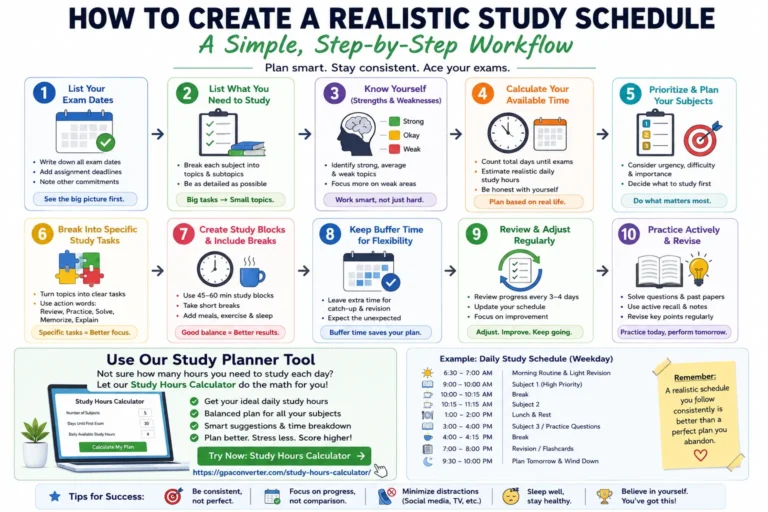
The Study Hours Calculator is a free study schedule generator that turns your exam date, available study days, and topic list into a realistic, day-by-day study plan. Instead of guessing how many hours to study or splitting time equally across every subject, it builds a weighted study schedule that gives more time to the topics you're weakest in and the ones you've marked as high priority โ then layers in practice sessions, review days, weak-spot repair, and a mock test before your exam.
It works for exam countdowns, weekly study planning, finals week, midterms, standardized test prep, or any deadline where you need to know exactly what to study and when โ not just how many hours in total.
Pick a start date, your exam date, and the days of the week you can realistically study โ sessions per week and total hours update live as you go.
Enter a topic count for a quick plan, or switch on Advanced to name each topic and tag its confidence and priority for a weighted plan.
Get a session-by-session schedule with learning, practice, weak-spot repair, review, and a mock test day built in โ copy, print, or share it.
Every session in your plan comes from the same transparent formula โ nothing here is a black box:
Readiness is a planning estimate based on time allocated, not a measurement of what you've actually learned.
Common questions about building a study schedule with this tool.
It depends on how many days you can realistically study and how long each session lasts. This calculator computes it for you โ pick your study days and session length, and the weekly hours are shown automatically rather than something you need to guess.
Confidence is how well you already know a topic (weak, medium, strong) โ weaker topics get more study time. Priority is how important that topic is to your grade or exam (low, medium, high) โ higher-priority topics also get more time. Together they decide how your total study hours are split across topics.
Either works. Enter a number of topics for a quick, evenly-weighted plan, or switch on Advanced mode to name each topic and tag its confidence and priority for a plan that gives more time to your weaker or higher-priority subjects.
Beyond core learning sessions, the plan can include practice sessions, dedicated weak-spot repair sessions for your lowest-confidence topics, spaced review sessions, and a mock test day near your exam date โ each can be turned on or off.
It compares the learning and practice hours your plan allocates against a recommended baseline built from each topic's confidence level. It's a planning signal โ how much time you've scheduled relative to what's typically needed โ not a measure of actual mastery.
Yes, it's completely free with no sign-up. The entire plan is generated in your browser โ no dates, topics, or schedule details are sent to or stored on a server.